


Statutory presence registration · NSSO
Statutory presence registrationfor cleaning and construction
Simple registration for your employees.
Less administration for you.
Checkinandoutatwork.be by Multi-Track is commercial software from MBSS NV for statutory attendance registration in Belgium. It supports your registration process and follow-up of NSSO responses. Checkinandoutatwork.be is an independent solution alongside the NSSO’s official online services.
Your employees register their arrival and departure at the work location.
We submit the registrations to the NSSO using your own certificate and follow up on every declaration until the final answer.
This keeps you in control and saves you time.
More than 2,000 employees already register with Checkinandoutatwork.be
Discover the solution for your sector
Choose your sector and discover how to simplify statutory presence registration.
 For cleaning of immovable property on behalf of a third party, where the declaration falls under the applicable conditions: employees, self-employed workers, temps and trainees register the start, the end and rest breaks themselves, on site.Choose cleaning02ConstructionSites from €500,000 excl. VAT · IN and OUT from 1 April 2027
 Today, arrival on site is registered in Check in at Work. According to the NSSO, IN and OUT registration via Check in and out at work becomes mandatory from 1 April 2027 (Programme Law of 30 May 2026). Not applicable to cleaning activities, but applicable to the delivery of ready-mix concrete.Choose construction
Registering is one thing.Being accepted is another.
A system that forwards data to the NSSO does not yet confirm that the registration was actually accepted. During an inspection, that is exactly what makes the difference. That is why we follow up on every declaration until the final answer, and report what went wrong instead of hiding it.
Rejected NSSO declarationTwo separate obligations
The daily check-in and check-out registration is separate from the Declaration of Works, which takes place beforehand.
A shared chain
Subcontractors and temporary workers register too, but you must be able to demonstrate this yourself.
- 06:58Employee 1042Kortrijk-Zuid site✓ Accepted by NSSO
- 07:03Employee 1187Kortrijk-Zuid site✓ Accepted by NSSO
- 07:11Subcontractor BGent-Dok site! Outside location zone
- 07:26Employee 0931Antwerpen-Noord site✓ Accepted by NSSO
- 12:40Employee 1187Leuven-Park site! Awaiting answer
- 16:02Employee 1042Kortrijk-Zuid site! Check-out missing
How it works
From the work location to the NSSO's answer.
- 01
Check in and out with one tap
At the start of the activity the employee checks in via the app, and checks out the same way at the end — always with one tap, in their own language. A geofence confirms each time that they are at the declared work location.
- 02
Declaration within the deadline
Both the check-in and check-out are automatically sent to the NSSO within the legal deadline, signed with your own company's NSSO certificate.
- 03
Followed up until the answer
Every declaration — both check-in and check-out — is tracked until it is definitively accepted or rejected. You can read the outcome in plain language.
Without their own smartphone
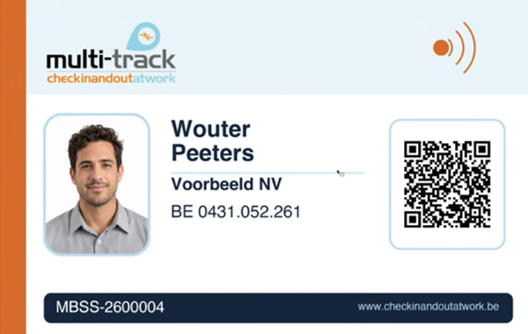
Register with a personal badge with both NFC and a QR code.
Not every worker wants or is able to use their own smartphone. With one personal Multi-Track badge containing both NFC and a QR code, they still register their own presence.
Three ways to register
- Smartphone app
- Read the badge via NFC
- Scan the QR code on the same badge
Via NFC or QR code on a central device or on the team leader's or site manager's smartphone, with NFC or a camera.
Arrival, departure and rest breaks can be registered with the badge.
The badge is personalised and produced by Multi-Track.
NSSO-compliant according to the conformity check carried out.
Also for internal time tracking
Offices, warehouses, logistics, workshops and manufacturing businesses can track working hours too. Start and end times, breaks and net hours come together in the online web platform. Records used solely for internal time tracking are not sent to the NSSO.
Principles
What matters in practice.
The same app and the same approach in both sectors. Location is only read at the moment of checking in or out: no background tracking.
- Accepted, not just sent
Forwarding is not confirmation. For every registration you see whether the NSSO has definitively accepted or rejected it.
- Errors are flagged
A check-in outside the permitted location zone or a missing registration is surfaced at the top, not quietly resolved.
- The whole chain
Subcontractors and temporary workers register too. The client or main contractor remains jointly responsible.
- Multilingual
An app in 12 languages, including right-to-left script, with PIN-code sign-in — usable while wearing gloves.
- Alongside what you already have
Registrations received by the NSSO via a time clock or badge system are followed up under the same contracts.
- EU and GDPR
Hosting in the EU, encrypted storage of NSSO certificates, full audit trail and role management.
Book a demo right away
See check-in and check-out live in a demo.
We walk through the three steps of how it works — checking in and out with one tap, the declaration within the deadline, and follow-up until the answer — and then show the portal for managers. For cleaning, construction, or both.
Disclaimer
The information on this site is general in nature and does not constitute legal advice. For your specific situation, consult a lawyer or your social secretariat.
Last verified on 10 October 2026.